Updated July 2026
Use AI to summarize YouTube videos
AI YouTube video summarizer Chrome extension — TLDR, timestamped outline, actionable to-dos, transcripts and AI chat from right inside YouTube. No paste-URL workflow

Very helpful for studying from youtube videos

Absolute game-changer for long podcasts! It is remarkably easy to use...

Awesome app! I can't believe how much time i'm saving everyday
Very helpful for studying from youtube videos
Absolute game-changer for long podcasts! It is remarkably easy to use...
Awesome app! I can't believe how much time i'm saving everyday
Get 1-click summaries from
Right inside YouTube watch page
YouTube videos summarized with SkipBait. Each with the same output shape: a preview, timestamped outline, actionable takeaways, transcript, and AI chat.
Summarize your first YouTube video with SkipBait.
Built for long content
Long content
up to 12 hrsSkipBait is built for long-form content — interviews, science deep-dives, and business conversations that run up to 12 hours long. Optimized to extract key details and actionable takeaways so you don't miss anything important.
1-click summary
Each summary includes a preview, an honest title, a topic-by-topic outline, and a list of actionable takeaways, each linked to its moment in the video — structured output you can skim, not a wall of text.
Ask follow-ups
auto web-searchAsk any questions or drop any outline or actionable points into chat easily using the Ask in Chat feature. Get web-grounded answers from AI that can web-search, not just transcript-search.
Timestamp navigation
Every key point in the outline links back to the exact moment in the video. Click a timestamp to jump directly to it when you want to hear it in context.
Translations
20+ languagesTranslate summary and transcript — turn foreign content into your native language or the other way around. Useful for international podcast episodes or reading in your native language.
Works inside YouTube
SkipBait works directly next to the YouTube video. No paste-URL workflow that is popular with web apps — install once and summarize every episode in a click on the watch page.
No credit counting
truly unlimitedUnlimited summary, transcript and translation for both summary and transcript. No credit or minute meters to ration before you generate a bundle. Free tier also available.
Download & export
Download the full summary bundle as text files, copy them to your clipboard or share to WhatsApp in just one click.
Who it's for
Researchers
Skim long talks and jump to the moments that matter — with timestamps to verify claims, names, and data points.
How it works under the hood
Learn more about using AI to summarize YouTube videos
What is an AI YouTube video summarizer?
An AI YouTube video summarizer tool turns a video into a short, structured summary. People often use related tools to get a breakdown of lectures, podcasts, tutorials, or news without watching the full video. A high quality summarizer is able to extract all important points of the video and present them in a structured format. These are the general steps.
- 1
Use the transcript as context
A video summarizer should automatically retrieve and use the video's transcript as context for the AI to generate a summary.
- 2
Crafted prompt
An internal, well-tested prompt is used to guide the AI to generate a summary that is tailored to the user's needs, accurate and fast.
- 3
Generate AI Summary
A summary is generated based on the given prompt and context given. AI output is screened for quality and finally shown to users.
How to summarize a YouTube video with AI?
You can summarize YouTube videos with AI in two main ways: paste a transcript into a general chatbot, or use a YouTube video summarizer Chrome extension directly inside YouTube. Here is how each path works.
Manual routes
With AI chatbots
1. ChatGPT or Claude
- Get the video's transcript. AI chat tools cannot watch videos directly. Use an online tool or SkipBait's free web tool to get the transcript text.
- Open ChatGPT or Claude. Both have capable free tiers and summarize video transcripts well. For long videos with lengthy transcript text, either split the transcript into sections or use models with a larger context window.
- Paste a prompt with the transcript. Be specific about the output you want — vague prompts like "summarize this" give inconsistent structure. For copy-paste prompts, see our full guide to optimizing your prompt for YouTube video summary.
2. YouTube's Ask
YouTube has its own AI feature, labelled Ask and powered by Gemini, that answers questions about a video without leaving the watch page. If you see an Ask button below a video, tap it and type a question or pick a suggested prompt like "Summarize this video." or use a custom prompt from this guide.
One-click route
With SkipBait
- Install SkipBait once.
- Visit YouTube watch page and click Get full summary bundle.
SkipBait YouTube video summarizer is a Chrome extension, not a paste-a-URL web application — it works directly inside YouTube.
Which method should you use?
TL;DR Use AI chatbots when you want custom prompting and do not mind pasting transcript + prompt each time. Use YouTube's Ask if it is available and you do not mind pasting prompt each time. Use SkipBait when you summarize videos often and want to get consistent, structured summary in one click.
- ChatGPT / Claude — custom prompting offers the most flexible way to have AI summarize a YouTube video. The trade-off is manual steps every time of getting the transcript + pasting it into the chat with a summarization prompt every video. Output format changes with your prompt; no built-in timestamps unless you also provide the timestamps and ask for them; best for one-off, custom summaries.
- YouTube Ask — no paste transcript workflow but still requires you to type a prompt each time, and unless you re-specify the format, the answer comes back as conversational text rather than a consistent, structured summary; ask without structured prompt means you get conversational answers that vary by question; no exportable bundle; best when Ask is in your region and you want a quick unstructured answer.
- SkipBait extension — install once, then one click per video; consistent TLDR, outline, and actionables every time; timestamped summary and export built in; best when you summarize YouTube videos often and want structured output next to the video every time. A chrome extension is the fastest path as it avoids copy-pasting transcript + prompt every time.
| ChatGPT / Claude | YouTube Ask | On-page extension | |
|---|---|---|---|
| Setup per video | Copy-paste transcript + prompt into chat tool | Copy-paste prompt into ask panel | Click Summarize |
| Output format | Changes based on your prompt | Changes based on your question | Consistent |
| Works on long videos | Need to ensure sufficient context window, otherwise response quality degrades | Yes | Yes |
| Timestamped summary | Yes if transcript contains timestamps | Ask to get | Always |
| Actionable insights | Prompt to get | Ask to get | Always |
| Best for | Custom, one-off summaries, gets repetitive when done more often | Prefers conversational output, does not mind copy-pasting prompt each time | Prefers one-click, structured output |

Structured summaries, not a paste-URL quota trap
Many AI tools to summarize YouTube videos make you paste a link on a separate site, ration you by credits, or return one block of text. SkipBait is built for the watch page: summarize YouTube videos with AI where you already watch, with output you can skim, jump through, and export.
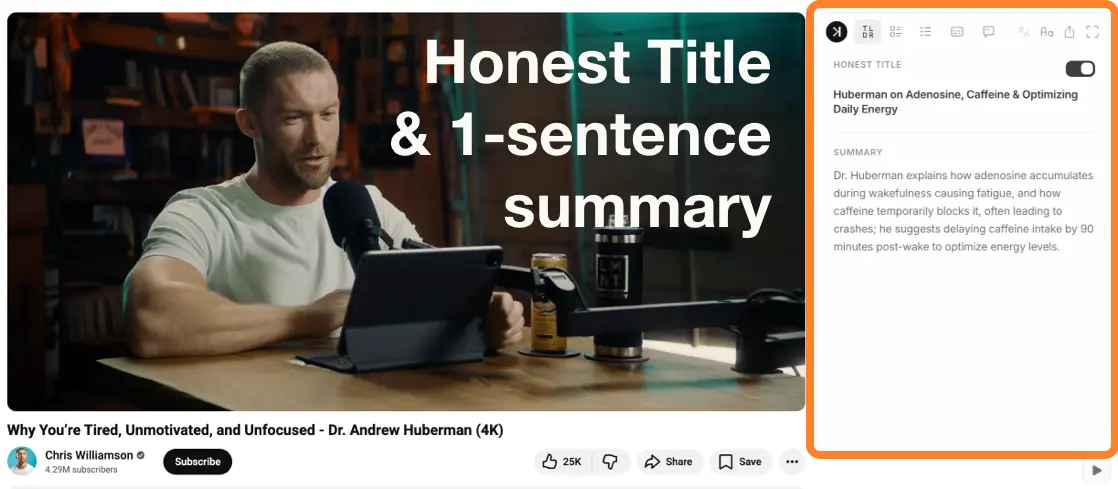
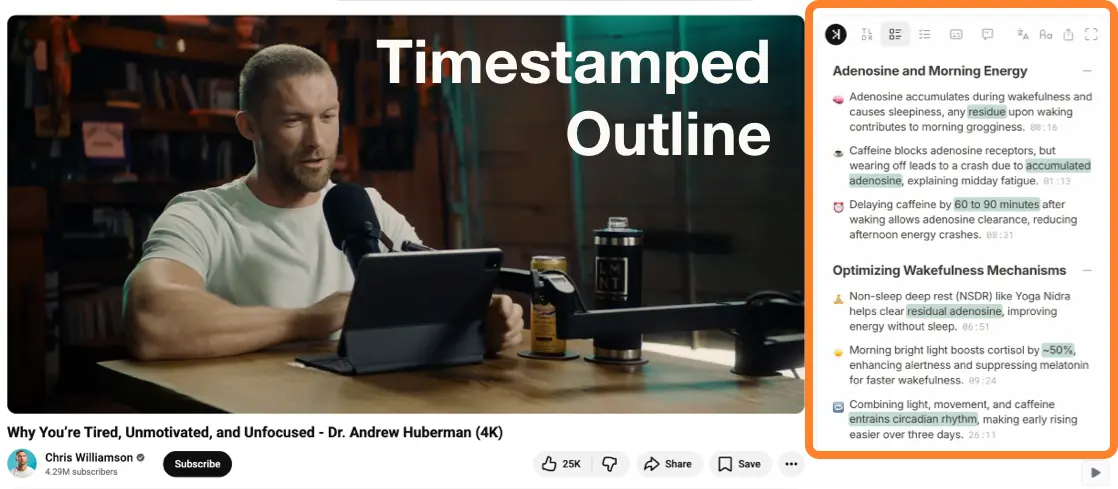
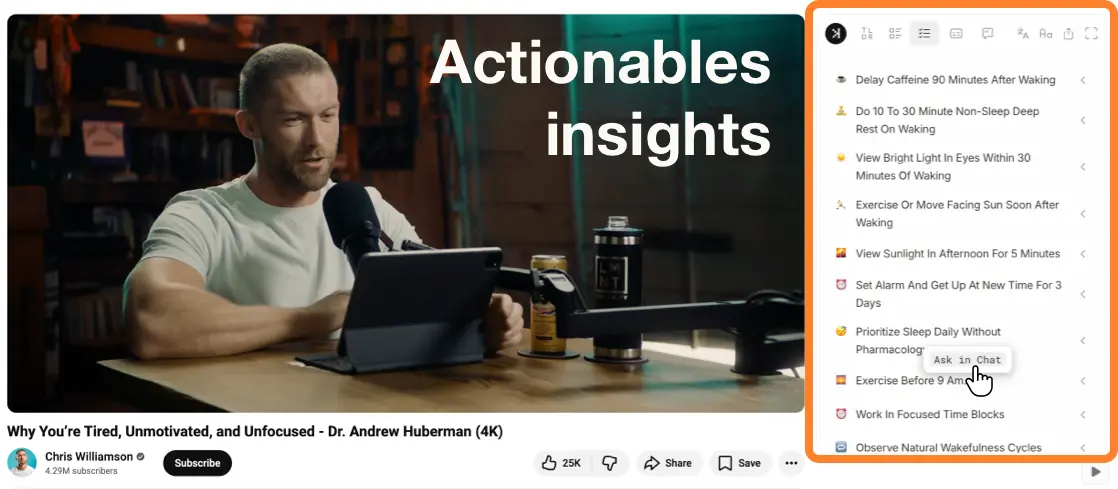
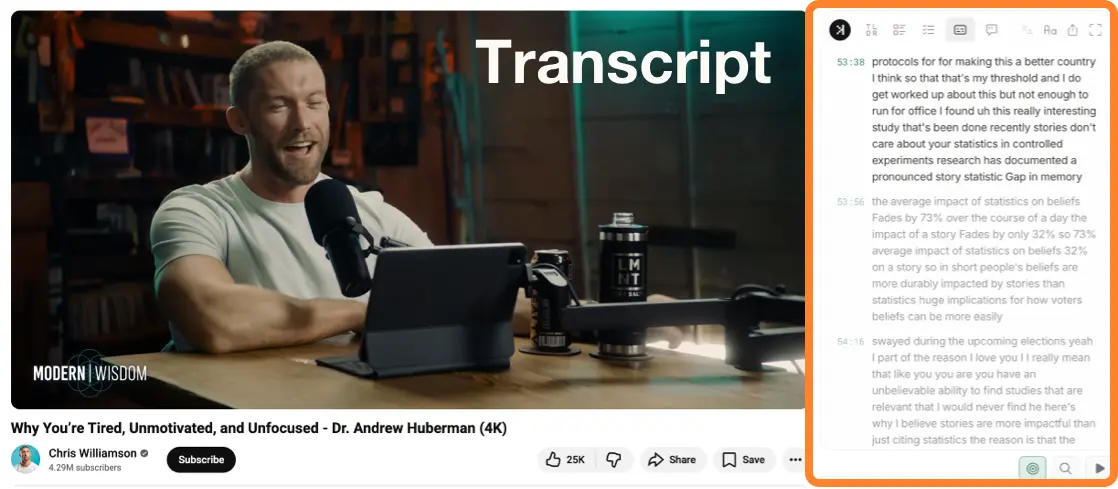
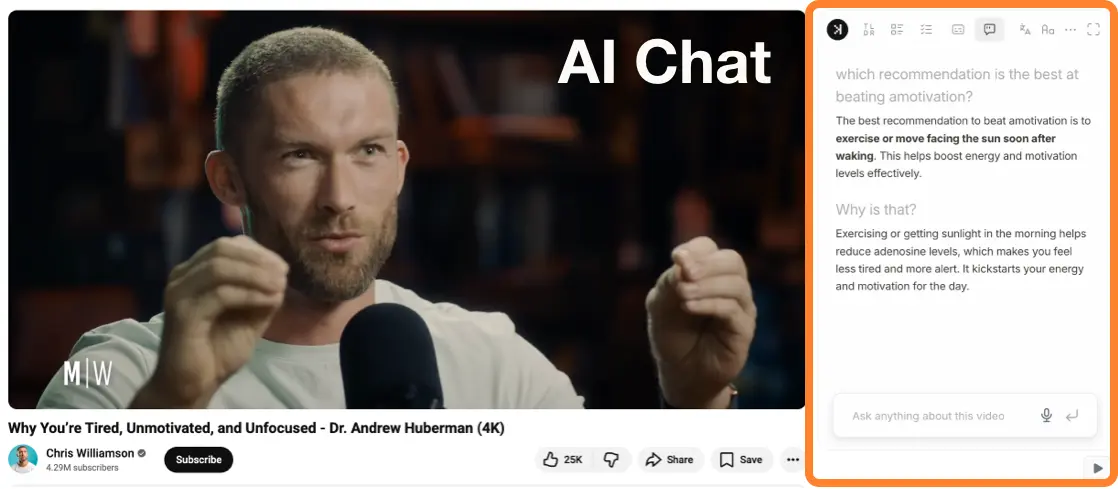
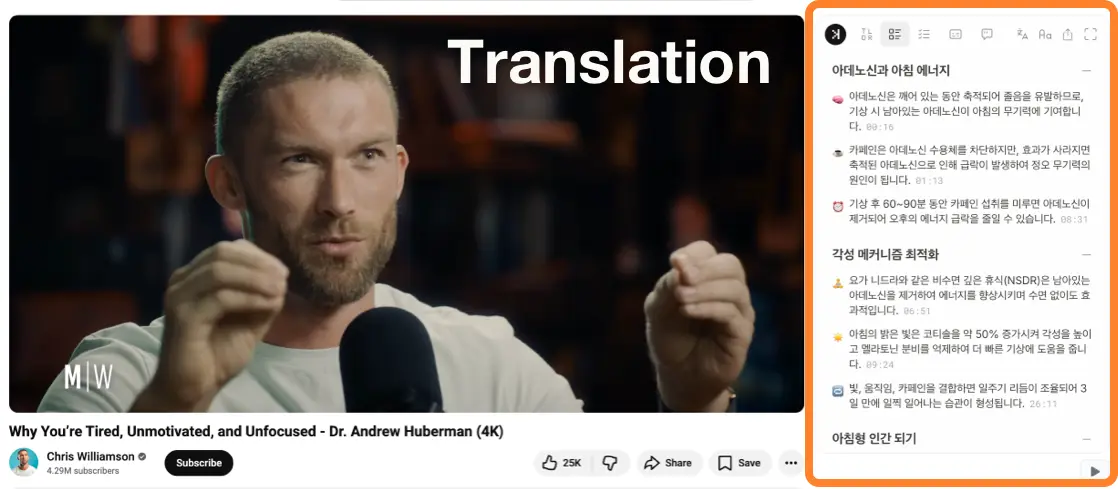
Generate summary,skim through actionables, jump to when the speaker discsussed it, ask AI chat questions, translate summaries or transcripts, or export as PDF — all from the same side panel next to the video player.
Summarize your first YouTube video with SkipBait.
Frequently asked questions
An AI YouTube video summarizer reads a video's captions and produces a short, structured summary — typically a TLDR, outline with timestamps, and key takeaways — so you can understand the video without watching all of it. SkipBait does this on the YouTube watch page as a Chrome extension, not on a separate paste-URL site.
Install the SkipBait Chrome extension, open a captioned YouTube video, and click Generate Summary Bundle. In seconds you get an honest title, TLDR, timestamped outline, and actionable to-dos. You do not need to generate a summary before using chat, but the bundle gives you structured key points to start from.
SkipBait's summary bundle is built for key points: TLDR for the one-line takeaway, a timestamped outline for section-by-section points, and actionable insights you can click to jump to the moment or pull into chat. That is more scannable than a single AI paragraph from a paste-URL summarizer.
SkipBait summarizes from the video's captions, so the summary reflects what was spoken (and any caption errors). It is best for understanding and revision — spot-check names, numbers, and technical terms before citing. Timestamp links let you verify any point against the source quickly.
Not with SkipBait. Summarization works from the video's existing transcript or captions — if a video has no captions at all, there is nothing to summarize. Most long-form videos have auto-generated or creator-uploaded captions; for those, SkipBait can summarize. SkipBait does not use audio speech recognition.
No. SkipBait is a Chrome extension that summarizes on the YouTube watch page — you do not paste a link into a separate website. If you want a free online transcript from a URL, use SkipBait's transcript downloader tool; if you want a one-click AI summary beside the player, install the extension.